Video editing no longer has to be hard or time-consuming. With the rise of short-form content on TikTok, Instagram Reels, and YouTube Shorts, creators are under constant pressure to produce eye-catching videos quickly. This is where CapCut video editing templates shine. They provide ready-made editing frameworks that can save hours of work and help you achieve a professional look with just a few taps.

In this article, we’ll explore what CapCut templates are, why they are useful, how to use them, their pros and cons, and safe tips for website monetization if you want to blog about them.
What Are CapCut Video Editing Templates?
A CapCut template is a pre-designed project with transitions, music sync, text, effects, and pacing already set. Instead of starting from scratch, you simply replace placeholders with your own clips or images.
Think of it as a recipe: the ingredients (your video clips) go into a well-prepared dish (the template), and the final result looks polished—even if you didn’t cook it from scratch.
Why CapCut Templates Are Popular (Key Benefits)
1. Save Time and Effort
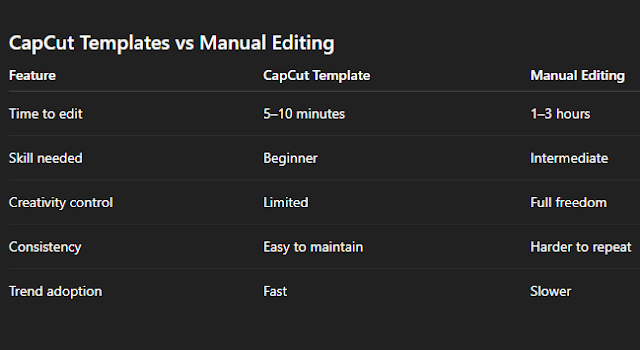
Editing normally takes hours—cutting, timing, adding text, syncing with beats. A CapCut template handles these steps in minutes.
2. Professional Look Without Skills
Even if you are a beginner, your video comes out with smooth transitions, synced effects, and polished text animations.
3. Consistency in Content
For brands and influencers, maintaining a consistent style is important. Templates give a uniform tone across multiple posts.
4. Learning by Example
By studying the layers of a template, beginners can learn editing tricks faster than from tutorials alone.
5. Multi-Platform Use
Most templates are optimized for 9:16 vertical format, so they are perfect for TikTok, Reels, and Shorts in one export.
Where to Find CapCut Templates
-
In-App CapCut Library → Search “beat sync,” “velocity,” “cinematic,” “before-after.”
-
Shared Template Links → Creators often share links with the tag “Use template in CapCut.”
-
Communities and Forums → Editing groups on Telegram, Facebook, or Reddit often exchange templates.

Step-by-Step: How to Use a CapCut Template
On Mobile
-
Open CapCut app.
-
Find a template link or use the template library.
-
Tap Use Template.
-
Add your photos or videos as requested.
-
Customize text and adjust timing.
-
Preview and fine-tune.
-
Export at 1080 × 1920 with high quality.
On Desktop
-
Download and open CapCut for PC.
-
Go to Templates.
-
Pick a style: aesthetic, beat-sync, travel, gaming, cinematic.
-
Replace placeholders with your media.
-
Adjust text and colors.
-
Export in MP4 at 30 or 60 fps.

When CapCut Templates Work Best
-
Trending challenges → Quick edits for viral sounds.
-
Brand promos → Consistent intros/outros.
-
Travel videos → Smooth montages.
-
Tutorials → Step-by-step with text overlays.
-
Event highlights → Weddings, parties, school events.
Limitations of CapCut Templates
-
Overuse: If too many creators use the same template, videos may feel repetitive.
-
Customization limits: Not ideal for unique, complex effects.
-
Music lock: Some templates only fit specific audio.
-
Performance issues: Heavy templates can lag on older devices.
-
Creativity cap: They enhance style but cannot replace original ideas.
Pro Tips to Customize Templates (Without Breaking Them)
-
Always hook the viewer in the first 2 seconds.
-
Use readable fonts with high contrast.
-
Replace stock text with short, engaging lines.
-
Add brand color accents for identity.
-
Do not overcrowd with stickers or emojis inside the video.
Examples of CapCut Template Types
-
Beat Sync Templates → Clip changes with music beats.
-
Velocity Templates → Slow-fast-slow motion for action shots.
-
Before & After Templates → Popular in beauty, fitness, and transformation videos.
-
Aesthetic Mood Templates → Soft filters and text for lifestyle vlogs.
-
Gaming Templates → Energetic edits for gameplay highlights.
Simple Content Ideas Using Templates
-
Tutorial: “How I Edited This Viral Reel in 5 Minutes Using CapCut Template.”
-
Comparison: “CapCut Template vs Manual Editing – Which Is Better?”
-
Round-Up: “Top 10 CapCut Templates for 2025 You Should Try.”
-
Case Study: “Before/After: Plain Clips Turned Into a Viral Short.”
Frequently Asked Questions (FAQ)
Do I need CapCut Pro for templates?
No. Most templates are free. Only a few advanced effects may require Pro.
Can I replace the music?
Yes, but the timing may not match. Always preview before exporting.
Will using templates hurt reach?
No. Algorithms care more about watch time and engagement, not editing tools.
Why does my exported video look blurry?
Make sure you export in 1080p or higher and avoid multiple compressions.
Can I monetize videos made with templates?
Yes, as long as your footage and music rights are clear. Templates themselves are safe.
Conclusion
CapCut video editing templates are a game-changer. They allow beginners and busy creators to produce pro-level videos in minutes, stay consistent across platforms, and ride trends without heavy effort. While they can’t replace creativity or original storytelling, they are powerful tools to save time and deliver polished results.
For bloggers, writing guides and tips on CapCut templates can attract traffic and earn AdSense approval—if content is original, well-formatted, and user-friendly.
Bottom line: Use templates to boost speed, polish, and engagement—but always add your own creative twist.